Today’s story is about how an external script manually loaded in from a Google Tag embed (gtag.js) trigger, caused super long loading times and tampered with a client’s website functionality.
1. The Problem
A client’s website suddenly had painfully slow loading times on the front-end. As in, on average 2-minutes-waiting-time slow. Just enough time to make a cup of coffee between page clicks.
They reached out for assistance, and we discovered that the website was loading indefinitely due to a body script referencing a 3rd-party network resource that was taking forever to load.
Basically, the script was referencing a URL endpoint of the 3rd party service (API) that no longer existed (the origin site was abandoned and seemed to time out after 60-120s when trying to load it).
^ By default, a website referencing any external network resources will not fully load until any and all dependent external network resources have successfully loaded first.
2. The Plot Twist?
The client did not recall adding this script to the site via the website back-end, and my job was to troubleshoot and identify the source of the script.
After scouring the entire website, there were no signs of the script in the site’s back-end settings, page settings, plugin settings, theme settings, or custom code snippets.
A real head-scratcher.
The Fix? Google Tag Manager
It was later discovered that the script loading in that custom 3rd-party resource was fired whenever one of the site’s Google Tags was initialized.
An investigation of that specific tag from the Google Tag Manager Dashboard revealed that the 3rd-party script was being loaded into the front-end of the site as one of the tag’s events/triggers (on page load).
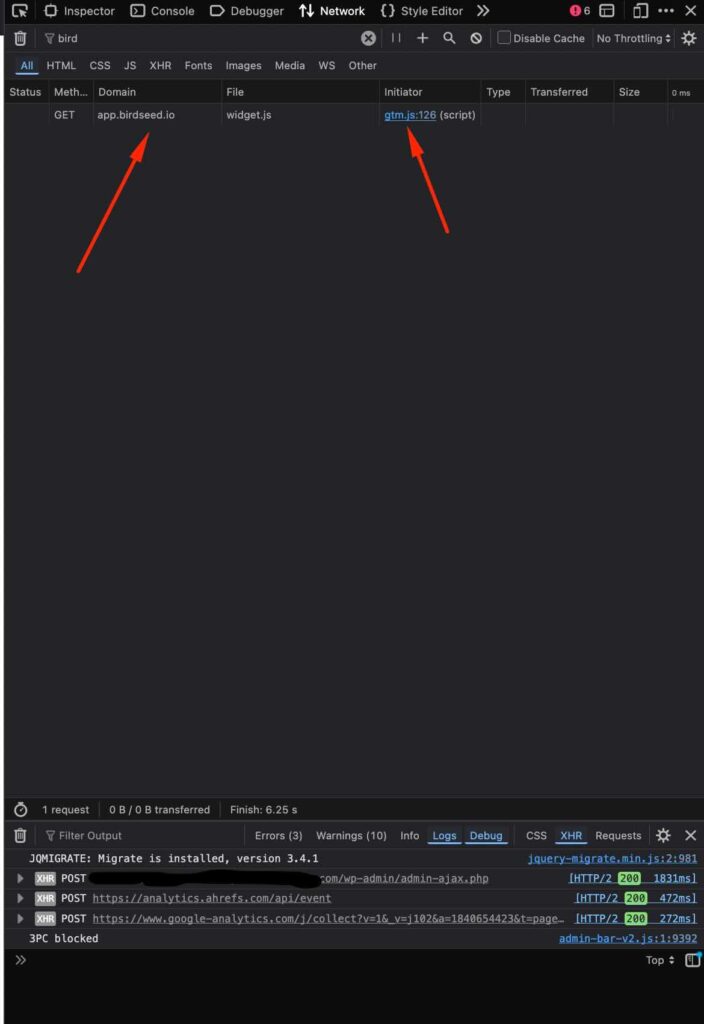
Disabling that specific 3rd-party script insertion event (trigger) from the GTag and publishing the new tag changes via GTM dashboard did the trick.
Okay, but why use Google Tag to load external scripts?
Some clients, together with the SEO companies that they work with, prefer to add certain custom tracking scripts or widgets to a website via a Google Tag event if they perhaps do not have adequate access to a website’s back-end to add the script there.
Although rare, this is a possibility to keep an eye out for.
Personally, I am not a fan of this approach, but I do understand its rare use cases.
TL:DR:
When working on a preexisting website configured by another person, if you are looking for the origin of a specific script that is loading anywhere on the site’s front-end, with no instance of its initialization anywhere in the site’s back-end or admin dashboard, your next step would be to investigate any Google Tags active on the website via any connected GTag properties.